Purpose
The purpose of this documentation is to implement an OAuth 2.0/OIDC authentication solution for a nginx web application.
Usefull links
Architecture
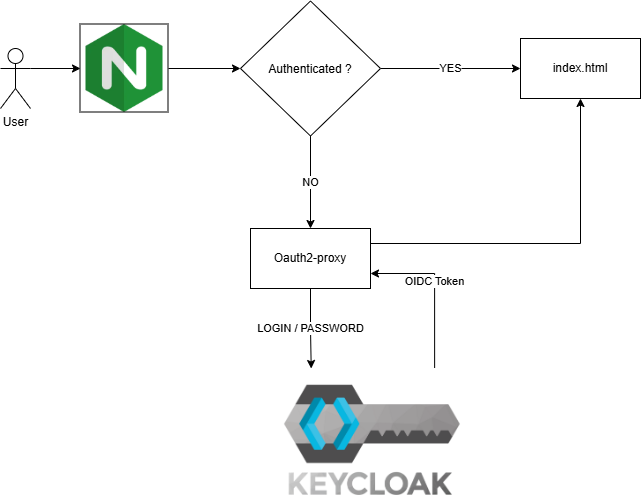
The architecture is a basic web app authentication running within a docker compose stack composed of:
nginx: to mock the web appoauth2-proxy: to redirect to Keycloak when unauthenticatedkeycloak: acts as an OpenID Connect (OIDC) Identity Provider. The following diagram describes the architecture
Context
Traditionally, accessing a protected service often meant providing credentials directly. OAuth introduced delegated authorization, allowing applications to receive limited access through tokens instead of handling the user's password.
OAuth 2.0 standardized and expanded this model for modern web applications and API architectures.
Stack
The purpose of this documentation is to implement an OAuth 2.0/OIDC authentication solution for a web application.
- Web application: a very basic Nginx web application consisting of a single
index.htmlpage. - Authentication server: Keycloak.
- Infrastructure:
- Ubuntu 24.04 running under WSL2.
- Docker.
Our Docker stack consists of three services:
nginx: our web application and reverse proxy.oauth2-proxy: handles the OIDC authentication flow and redirects users to Keycloak when authentication is required.keycloak: our identity and authentication server.
Requirements
- WSL2 or another hypervisor such as Hyper-V, VMware, or VirtualBox.
PS C:\> wsl --version
WSL version: 2.6.3.0
Kernel version: 6.6.87.2-1
WSLg version: 1.0.71
MSRDC version: 1.2.6353
Direct3D version: 1.611.1-81528511
DXCore version: 10.0.26100.1-240331-1435.ge-release
Windows version: 10.0.26200.9711
$ docker version
Client: Docker Engine - Community
 Version:           29.9.2
 API version:       1.56
 Go version:        go1.26.10
 Git commit:        a82e528
 Built:             Tue Oct 20 18:44:40 2026
 OS/Arch:           linux/amd64
 Context:           default

Server: Docker Engine - Community
 Engine:
  Version:          29.9.2
  API version:      1.56 (minimum version 1.40)
  Go version:        go1.26.10
  Git commit:        0367cbe
  Built:             Tue Oct 20 18:44:40 2026
  OS/Arch:           linux/amd64
  Experimental:     false
 containerd:
  Version:          v2.4.2
  GitCommit:        b7a25261e029d68978bbf290df0a62fc819b3c51
 runc:
  Version:          1.5.2
  GitCommit:        v1.5.2-0-g29dd3dc2
 docker-init:
  Version:          0.19.0
  GitCommit:        de40ad0
Keycloak uses callback url mechanism, to avoid any redirection problem update the
/etc/hostsfile. On Windows, the equivalent file is located at:C:\Windows\System32\drivers\etc\hostsAdd:
127.0.0.1 localhost keycloak
Stack
Authentication Diagram
flowchart TD
    A[Mike] --> B[Nginx]
    B --> C{Authenticated?}

    C -->|Yes| D[Application]
    C -->|No| E[OAuth2 Proxy]

    E --> F[Keycloak]
    F --> G[Login / Password]
    G --> H[OIDC Token]
    H --> E
    E --> D
As described above, our stack runs using Docker Compose. For each service, I will describe its docker-compose.yaml block and configuration.
Requirements
Before configuring the services, we need to create a common Docker network.
In the docker-compose.yaml file:
services:
    # nginx
    # oauth2-proxy
    # keycloak

networks:
    web:
The Docker network will be created automatically the first time we run:
docker compose up
We can verify that the network has been created with:
$ docker network ls
NETWORK ID     NAME         DRIVER    SCOPE
0072503fa7f2   bridge       bridge    local
0e7185d1e2c6   host         host      local
10756ce2dcea   none         null      local
7f1b97eabaca   oauth2_web   bridge    local # <-- Docker network created by Docker Compose
Nginx
Docker Compose Block
What do we need?
- A Docker image:
nginx:stable-alpine3.24-slim, available on Docker Hub. Keep in mind that using thelatesttag is generally not recommended. - Port mapping: we want to access our web application through port
8080on the host, mapped to port80inside the container. - Two volumes:
- The Nginx configuration.
- The HTML index page.
- A dependency on the
oauth2-proxyservice, which itself depends on Keycloak. - The shared
webnetwork.
Docker Compose configuration:
services:
  nginx:
    image: nginx:stable-alpine3.24-slim
    container_name: nginx
    ports:
      - "8080:80"
    volumes:
      - ./nginx.conf:/etc/nginx/conf.d/default.conf:ro
      - ./html:/usr/share/nginx/html:ro
    depends_on:
      oauth2-proxy:
        condition: service_started
    networks:
      - web

networks:
  web:
Nginx Configuration
server {
    listen 80;
    server_name localhost;

    location = /oauth2/auth {
        internal;

        proxy_pass http://oauth2-proxy:4180/oauth2/auth;

        proxy_set_header X-Original-URI $request_uri;
        proxy_set_header X-Real-IP $remote_addr;

        proxy_pass_request_body off;
        proxy_set_header Content-Length "";
    }

    location /oauth2/ {
        proxy_pass http://oauth2-proxy:4180;

        proxy_set_header Host $host;
        proxy_set_header X-Real-IP $remote_addr;
        proxy_set_header X-Forwarded-Proto $scheme;
        proxy_set_header X-Auth-Request-Redirect $request_uri;
    }

    location / {
        auth_request /oauth2/auth;
        error_page 401 = /oauth2/sign_in;

        root /usr/share/nginx/html;
        index index.html;
    }
}
| Nginx directive | Description |
|---|---|
listen 80 |
Listens for incoming HTTP connections on port 80. |
server_name localhost |
Defines localhost as the hostname handled by this server block. |
location = /oauth2/auth |
Defines the internal endpoint used to check whether a request is authenticated. |
internal |
Prevents clients from accessing /oauth2/auth directly. |
proxy_pass http://oauth2-proxy:4180/oauth2/auth |
Forwards authentication checks to OAuth2 Proxy. |
proxy_set_header X-Original-URI $request_uri |
Sends the originally requested URI to OAuth2 Proxy. |
proxy_set_header X-Real-IP $remote_addr |
Sends the client's IP address to OAuth2 Proxy. |
proxy_pass_request_body off |
Prevents the original request body from being forwarded during the authentication check. |
proxy_set_header Content-Length "" |
Clears Content-Length because the authentication subrequest has no body. |
location /oauth2/ |
Handles OAuth2 Proxy endpoints such as sign-in and callback. |
proxy_pass http://oauth2-proxy:4180 |
Forwards /oauth2/ requests to OAuth2 Proxy. |
proxy_set_header Host $host |
Preserves the original hostname. |
proxy_set_header X-Forwarded-Proto $scheme |
Tells OAuth2 Proxy whether the original request used HTTP or HTTPS. |
proxy_set_header X-Auth-Request-Redirect $request_uri |
Provides the URI to return to after authentication. |
location / |
Defines the main protected website location. |
auth_request /oauth2/auth |
Performs an authentication subrequest before serving the requested resource. |
error_page 401 = /oauth2/sign_in |
Sends unauthenticated users to the OAuth2 Proxy sign-in endpoint. |
root /usr/share/nginx/html |
Defines the directory containing the website's static files. |
index index.html |
Defines index.html as the default file. |
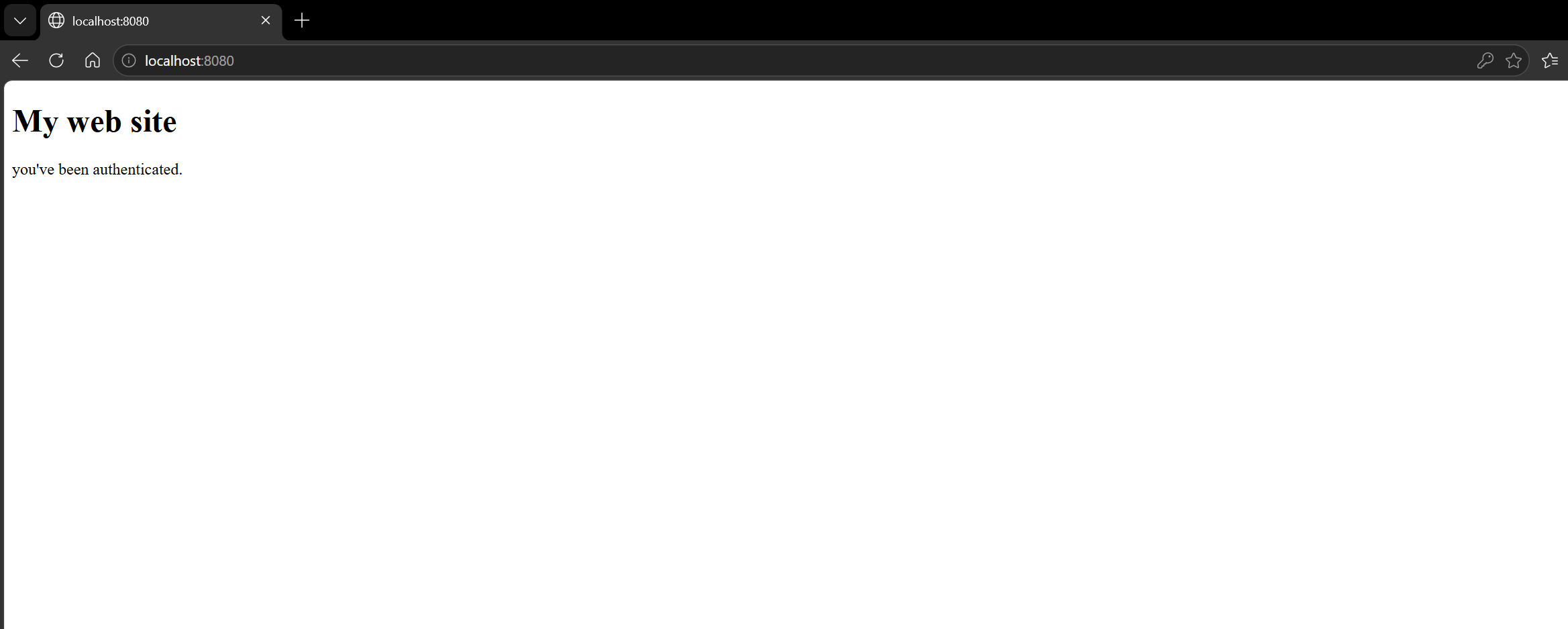
Index html file
A simple file that mock a web application:
<!doctype html>
<html>
<body>
    <h1>My web site</h1>
    <p>you've been authenticated.</p>
</body>
</html>
OAuth2 Proxy
Docker compose block
What do we need?
A Docker image:
dhi.io/oauth2-proxy:7-debian.The following environment variables:
OAUTH2_PROXY_PROVIDER: "oidc": Configures OAuth2 Proxy to use OpenID Connect (OIDC).OAUTH2_PROXY_OIDC_ISSUER_URL: "http://keycloak:8081/realms/myrealm": Defines the OIDC issuer URL. In our case, this points to the Keycloak realm running inside the Docker network.OAUTH2_PROXY_CLIENT_ID: "my_client_id": The client ID registered in Keycloak. The same client ID must be configured on both sides.OAUTH2_PROXY_CLIENT_SECRET: "my_client_secret": The secret associated with the client ID. OAuth2 Proxy uses it to authenticate itself to Keycloak.OAUTH2_PROXY_COOKIE_SECRET: A symmetric encryption secret used to secure OAuth2 Proxy session cookies.It can be generated using:
openssl rand -base64 32 | tr '+/' '-_'OAUTH2_PROXY_EMAIL_DOMAINS: "*": Controls which email domains are allowed.*allows all email addresses. In a company environment, this could instead be restricted to a domain such asmycompany.com.OAUTH2_PROXY_HTTP_ADDRESS: "0.0.0.0:4180": Defines the address and port on which OAuth2 Proxy listens.OAUTH2_PROXY_REDIRECT_URL: "http://localhost:8080/oauth2/callback": Defines the callback URL to which the browser is redirected after authentication.Browser │ ▼ Keycloak login │ │ Authentication successful ▼ http://localhost:8080/oauth2/callback │ ▼ OAuth2 ProxyOAUTH2_PROXY_REVERSE_PROXY: "true": Indicates that OAuth2 Proxy is running behind a reverse proxy, Nginx in our architecture.OAUTH2_PROXY_SET_XAUTHREQUEST: "true": Enables the Nginx integration by exposing authentication information through the response headers of/oauth2/auth. Nginx can then forward this information to the application.
Within the network
webOAuth2 service depends on keycloak to be up AND RUNNING !, if we just set a vanilla
depends_onthe container will fail as it needs to access the keycloak realm configuration through keycloak URL. So I set the followingdepends_onconfiguration using the Docker documentationservices: oauth2-proxy: depends_on: keycloak: # Service condition: service_healthy # This specifies that a dependency is expected to be “healthy”, which is defined with healthcheck, before starting a dependent service restart: true # ensures that if keycloak is updated or restarted due to an explicit Compose operation, for example `docker compose restart`, the oauth2-proxy service is also restarted automatically, ensuring it re-establishes connections or dependencies correctly
The corresponding docker-compose.yaml block is:
oauth2-proxy:
  image: dhi.io/oauth2-proxy:7-debian
  container_name: oauth2-proxy
  environment:
    OAUTH2_PROXY_PROVIDER: oidc
    OAUTH2_PROXY_OIDC_ISSUER_URL: ${OIDC_ISSUER_URL}
    OAUTH2_PROXY_CLIENT_ID: ${CLIENT_ID}
    OAUTH2_PROXY_CLIENT_SECRET: ${CLIENT_SECRET}
    OAUTH2_PROXY_COOKIE_SECRET: ${COOKIE_SECRET}
    OAUTH2_PROXY_EMAIL_DOMAINS: "*"
    OAUTH2_PROXY_HTTP_ADDRESS: "0.0.0.0:4180"
    OAUTH2_PROXY_REDIRECT_URL: "http://localhost:8080/oauth2/callback"
    OAUTH2_PROXY_REVERSE_PROXY: "true"
    OAUTH2_PROXY_SET_XAUTHREQUEST: "true"
  depends_on:
    keycloak:
      condition: service_healthy
      restart: true
  networks:
    - web
Oauth2-proxy configuration
There is no configuration file, the configuration values are stored in a .env file:
CLIENT_ID=my_client_id
CLIENT_SECRET=my_client_secret
OIDC_ISSUER_URL=http://keycloak:8081/realms/myrealm
COOKIE_SECRET=<generated-cookie-secret>
KC_BOOTSTRAP_ADMIN_USERNAME=kc_admin
KC_BOOTSTRAP_ADMIN_PASSWORD=<admin-password>
Keycloak
Docker Compose block
What do we need?
A Docker image:
quay.io/keycloak/keycloak:26.7Additional startup options:
start-dev: Starts the server in development mode for local development and testing.--import-realm: Imports the realm configuration at startup from thedata/importdirectory.--http-port=8081: Configures the main Keycloak HTTP server to listen on port 8081 instead of the default port 8080, avoiding a port conflict with Nginx.
Environment variables:
KC_BOOTSTRAP_ADMIN_USERNAME: ${KC_BOOTSTRAP_ADMIN_USERNAME}: Defines the bootstrap administrator username.KC_BOOTSTRAP_ADMIN_PASSWORD: ${KC_BOOTSTRAP_ADMIN_PASSWORD}: Defines the bootstrap administrator password.KC_HEALTH_ENABLED: "true": Enables Keycloak health-check endpoints. The readiness endpoint/health/readyis used by the Docker healthcheck to determine when Keycloak is ready to process requests.
Healthcheck: As explained in the
oauth2-proxysection, we need to ensure that Keycloak is ready before starting services that depend on it. Sincecurlis not available in the Keycloak container image, the healthcheck opens a TCP connection directly and sends an HTTP request to the readiness endpoint:exec 3<>/dev/tcp/127.0.0.1/9000 # Open a TCP connection and assign it to file descriptor 3 printf 'GET /health/ready HTTP/1.1\r\nHost: localhost\r\nConnection: close\r\n\r\n' >&3 # Send the HTTP request through file descriptor 3 grep -q '200 OK' <&3 # Check whether the response contains "200 OK"The
webDocker network, allowing Keycloak to communicate with the other services.A shared volume containing the Keycloak realm configuration.
The corresponding docker-compose.yaml configuration is:
keycloak:
  image: quay.io/keycloak/keycloak:26.7
  container_name: keycloak
  command:
    - start-dev
    - --import-realm
    - --http-port=8081
  environment:
    KC_BOOTSTRAP_ADMIN_USERNAME: ${KC_BOOTSTRAP_ADMIN_USERNAME}
    KC_BOOTSTRAP_ADMIN_PASSWORD: ${KC_BOOTSTRAP_ADMIN_PASSWORD}
    KC_HEALTH_ENABLED: "true"
  volumes:
    - ./keycloak:/opt/keycloak/data/import
  ports:
    - "8081:8081"
  healthcheck:
    test:
      [
        "CMD-SHELL",
        "exec 3<>/dev/tcp/127.0.0.1/9000 && printf 'GET /health/ready HTTP/1.1\r\nHost: localhost\r\nConnection: close\r\n\r\n' >&3 && grep -q '200 OK' <&3"
      ]
    interval: 5s
    timeout: 5s
    retries: 30
    start_period: 20s
  networks:
    - web
Keycloak configuration
realm
Defines the Keycloak realm used by the application for authentication.
A realm in Keycloak is equivalent to a tenant. Each realm allows an administrator to create isolated groups of applications and users. Initially, Keycloak includes a single realm, called master. Use this realm only for managing Keycloak and not for managing any applications.
Source: Official Keycloak documentation
"realm": "myrealm",
"enabled": true
roles
Defines the roles available to the client application. Here, the user role is created as a client-specific role for my_client_id.
"roles": {
  "client": {
    "my_client_id": [
      {
        "name": "user",
        "description": "Standard application user",
        "clientRole": true
      }
    ]
  }
}
clients
Defines the application registered with Keycloak as an OpenID Connect client. It specifies the client ID, client secret, protocol, allowed redirect URI, and web origin.
"clients": [
  {
    "clientId": "my_client_id",
    ...
  }
]
users
Defines the users created when the realm configuration is imported. In this example, the mike user is created with a password and assigned the user client role for my_client_id.
"users": [
  {
    "username": "mike",
    ...
  }
]
credentials
Defines the credentials used to authenticate the user. Here, mike is configured with a permanent password (temporary: false).
clientRoles
Assigns client-specific roles to the user. Here, mike is assigned the user role for the my_client_id client.
Docker compose final file
services:
  nginx:
    image: nginx:stable-alpine3.24-slim
    container_name: nginx
    ports:
      - "8080:80"
    volumes:
      - ./nginx.conf:/etc/nginx/conf.d/default.conf:ro
      - ./html:/usr/share/nginx/html:ro
    depends_on:
      oauth2-proxy:
        condition: service_started
    networks:
      - web

  oauth2-proxy:
    image: dhi.io/oauth2-proxy:7-debian
    container_name: oauth2-proxy
    environment:
      OAUTH2_PROXY_PROVIDER: oidc
      OAUTH2_PROXY_OIDC_ISSUER_URL: ${OIDC_ISSUER_URL}
      OAUTH2_PROXY_CLIENT_ID: ${CLIENT_ID}
      OAUTH2_PROXY_CLIENT_SECRET: ${CLIENT_SECRET}
      OAUTH2_PROXY_COOKIE_SECRET: ${COOKIE_SECRET}
      OAUTH2_PROXY_EMAIL_DOMAINS: "*"
      OAUTH2_PROXY_HTTP_ADDRESS: "0.0.0.0:4180"
      OAUTH2_PROXY_REDIRECT_URL: "http://localhost:8080/oauth2/callback"
      OAUTH2_PROXY_REVERSE_PROXY: "true"
      OAUTH2_PROXY_SET_XAUTHREQUEST: "true"
    depends_on:
      keycloak:
        condition: service_healthy
        restart: true
    networks:
      - web

  keycloak:
    image: quay.io/keycloak/keycloak:26.7
    container_name: keycloak
    command:
      - start-dev
      - --import-realm
      - --http-port=8081
    environment:
      KC_BOOTSTRAP_ADMIN_USERNAME: ${KC_BOOTSTRAP_ADMIN_USERNAME}
      KC_BOOTSTRAP_ADMIN_PASSWORD: ${KC_BOOTSTRAP_ADMIN_PASSWORD}
      KC_HEALTH_ENABLED: "true"
    volumes:
      - ./keycloak:/opt/keycloak/data/import
    ports:
      - "8081:8081"
    healthcheck:
      test:
        [
          "CMD-SHELL",
          "exec 3<>/dev/tcp/127.0.0.1/9000 && printf 'GET /health/ready HTTP/1.1\r\nHost: localhost\r\nConnection: close\r\n\r\n' >&3 && grep -q '200 OK' <&3"
        ]
      interval: 5s
      timeout: 5s
      retries: 30
      start_period: 20s
    networks:
      - web

networks:
  web:
Run the stack
Start all services:
cd docker-compose
docker compose up -d
Check the logs:
docker compose logs -f nginx
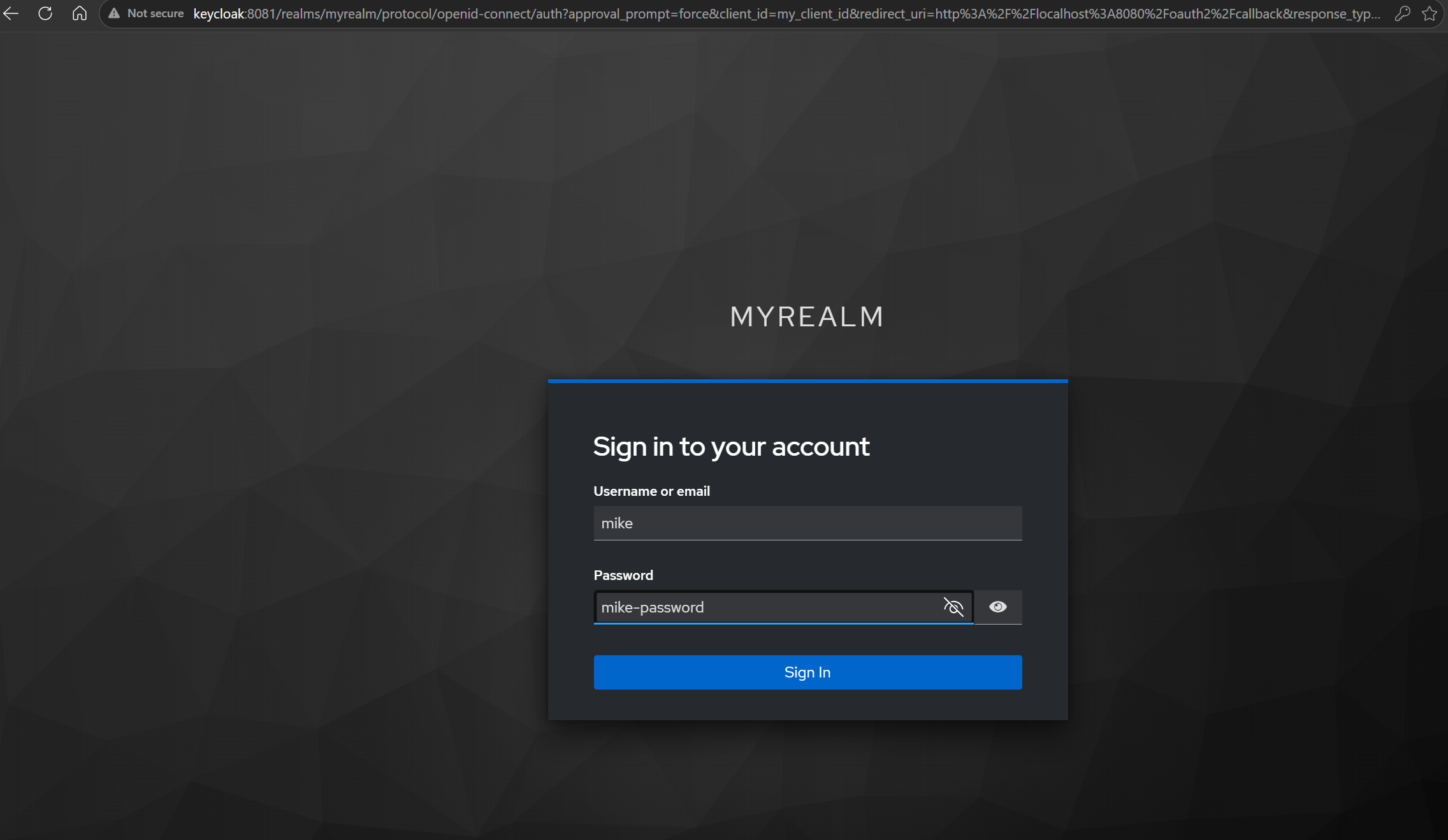
Test the authentication flow in the browser
- Open
http://localhost:8080.
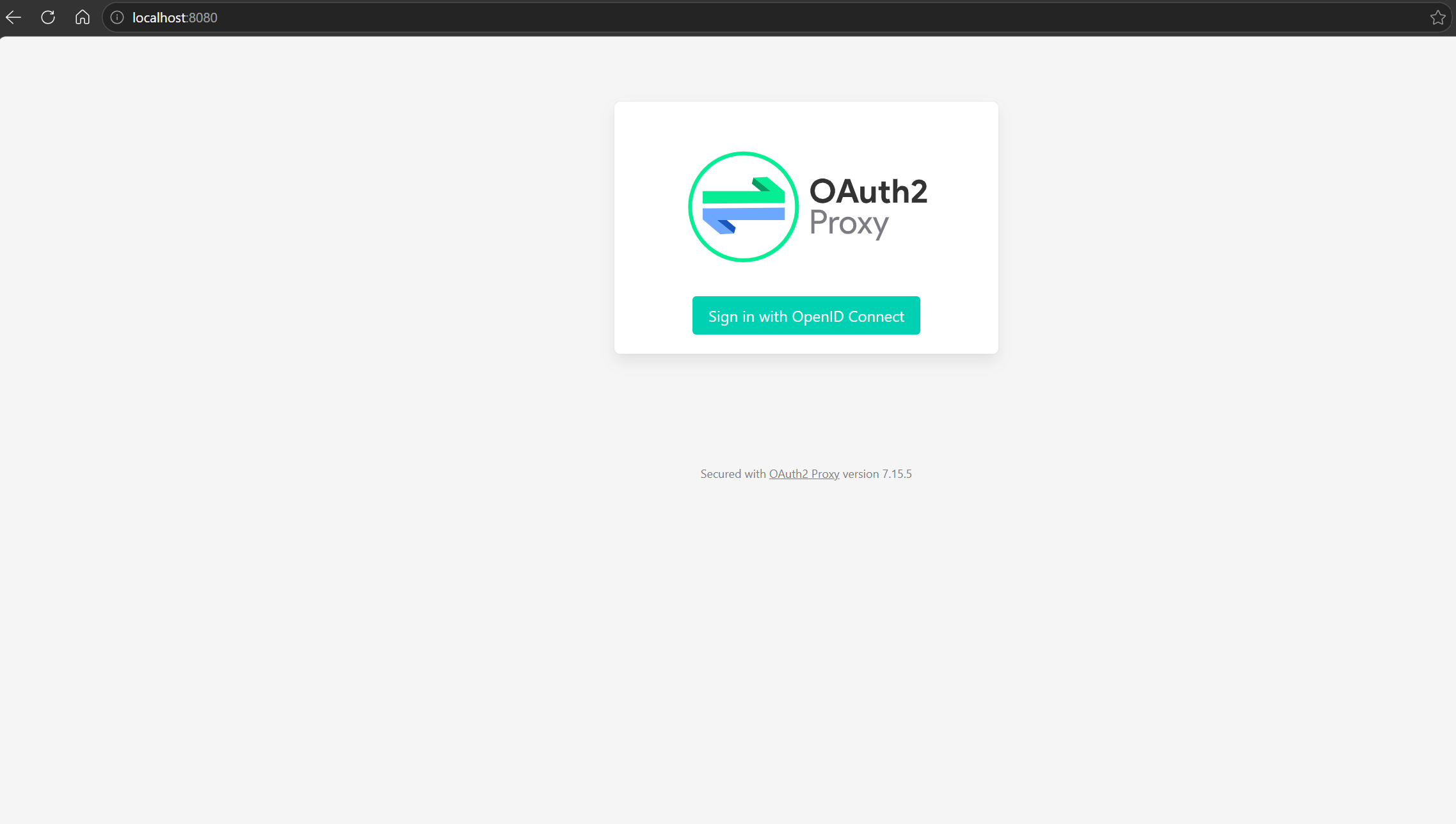
- Click Sign in and enter the user redirected to the protected application.
- You are logged !
Comments
Join the discussionNo comments yet. Be the first to comment.